> For the complete documentation index, see [llms.txt](https://docs.bizmagnets.ai/llms.txt). Markdown versions of documentation pages are available by appending `.md` to page URLs; this page is available as [Markdown](https://docs.bizmagnets.ai/additional-details/automations-rules/chat-inbox-configuration.md).
# Chat Inbox Configuration
The Chat Inbox Configuration in BizMagnets refers to the settings and rules that define how incoming sales conversations are managed within the sales inbox.
This configuration is essential for organizing customer interactions, ensuring efficient responses, and providing a streamlined communication experience.
When setting up your chat inbox in the WhatsApp API, there are several key configurations you can adjust to optimize your customer interactions. Below are the important settings to consider:
### **Working Hours**
Working hours set the specific hours during which your business is available to respond to customer inquiries. It's purpose is to clearly communicate your availability to customers and manage expectations regarding response times. Outside of these hours, automated messages can handle initial interactions.
**Special Days:**
Special days allows you to set specific days with modified working hours that differ from your standard schedule. You can choose between a 'Single Date' or a 'Date Range' to apply these special hours. This is useful for events like holidays, staff training days, or any other occasion where the regular schedule is altered.
**Closed Days:**
Closed days is for marking specific days when the business will be completely closed. You can use this to indicate days when the business will not be operating at all, such as on major holidays (e.g., Christmas Day, New Year's Day) or for scheduled closures.
### **Welcome Message**
Welcome message is a predefined message that is automatically sent to customers when they first initiate a chat. It's purpose is to greet customers and provide them with a brief introduction or guidance on how you can assist them. This sets a positive tone and helps direct the conversation.
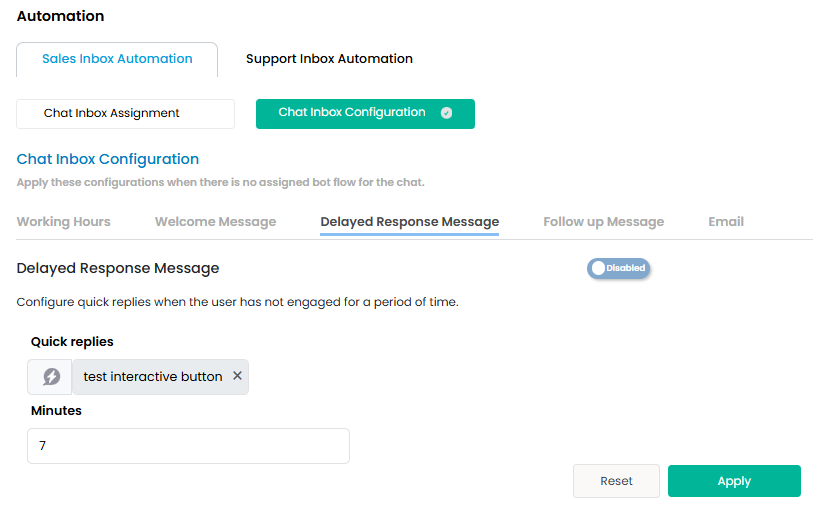
### **Delayed Response Message**
Delayed Response Message is an automated message that is triggered if there is a delay in responding to a customer inquiry. It's purpose is to inform customers that their message has been received and that a response will follow soon. This helps maintain customer engagement and reduces frustration during wait times.
### **Follow-Up Message**
Follow-Up Message is a message sent to customers after a certain period or following a specific interaction, such as after a purchase or support request. It's purpose is to keep the conversation active by checking in with customers, offering additional assistance, or thanking them for their engagement. Follow-ups can improve customer retention and satisfaction.
### **Email**
Email is the option to configure email notifications for messages received outside of working hours or when a customer requires further follow-up that can't be handled within the chat. It's purpose is to ensure that important customer communications are not missed by receiving notifications or continuing the conversation via email when necessary.
By configuring these elements in your chat inbox, you can ensure a well-organized and responsive communication system that enhances customer experience and supports efficient interaction management.