> For the complete documentation index, see [llms.txt](https://docs.bizmagnets.ai/llms.txt). Markdown versions of documentation pages are available by appending `.md` to page URLs; this page is available as [Markdown](https://docs.bizmagnets.ai/analytics/view-insights.md).
# View Insights
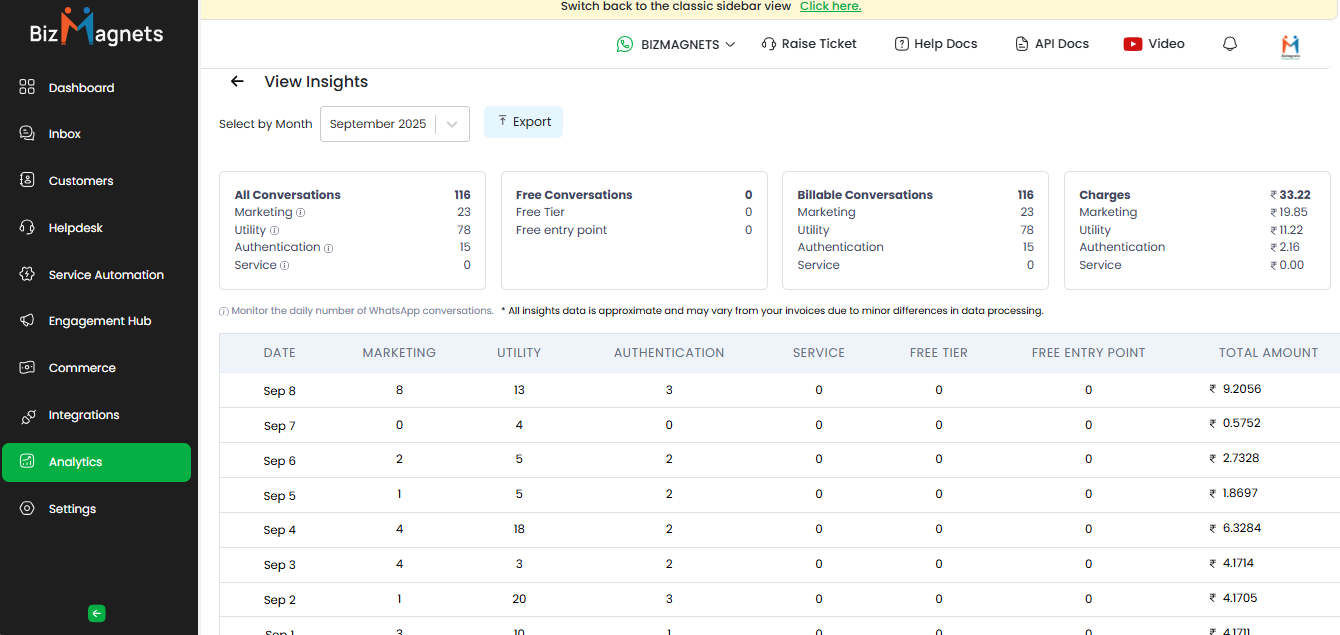
You can access valuable metrics that offer insights into user engagement, message delivery, and response patterns from BizMagnets.
This data can help you gauge engagement levels, manage support resources, and optimize response times.
## View Insights for Conversations
* **All Conversations**: Shows the total number of conversations initiated daily. This helps assess the volume of customer interactions each day.
* **Free conversation:** Shows the total number of message thread within a 24-hour window initiated by the business without charge.
* **Billable conversation:** Shows the total number of customer-initiated or out-of-window interaction that incurs a charge.
* **Charges:** Detail costs associated with each billable conversation based on the pricing structure.
## Exporting Reports
Use export options to download daily conversation metrics.
Regularly checking and analyzing daily conversation data helps maintain a high standard of customer service, optimize response efficiency, and identify trends in customer inquiries or behaviors on WhatsApp.